Introduction
Delivering high-quality software in today’s enterprise environment is increasingly challenging due to the scale, complexity, and rapid evolution of modern systems. Manual testing alone is time-consuming, error-prone, and difficult to scale.
To address these challenges, our team adopted an AI-assisted automation approach using GitHub Copilot and complementary large language models. This transformation changed how we design, generate, review, and execute automation scripts. This blog shares our journey in a tool-agnostic and project-neutral way, highlighting the challenges we faced, how AI reshaped our testing workflow, and the tangible benefits we achieved.
1. Automation Context
Our automation landscape represents a large enterprise application ecosystem:
- Thousands of test cases across multiple functional domains
- Coverage across web and mobile platforms
- End-to-end validation spanning configuration, transactions, reporting, and integrations
Such breadth requires a scalable, maintainable, and standardized AI-assisted automation strategy, independent of any single product or testing tool.
2. How We’re Using AI in Automation
A. AI for Test Case & Test Data Generation
We leverage GitHub Copilot with advanced language models to assist in generating automation scripts:
- Fetches test steps from work items in an application lifecycle management (ALM) system
- Generates automation scripts aligned with our internal framework standards
- Enhances test coverage using a multi-source enrichment approach, analyzing:
- Application logic and configuration
- Existing automation patterns
- Page or screen object definitions
- Business rules and validation logic
- Official product or domain documentation
Safety & Quality Features:
A. Pattern-based script generation
- Pattern-based script generation
- Framework compliance checks
- Reduced hallucination risk through controlled prompts
- Flags unclear or ambiguous logic as [NEEDS VERIFICATION] for human review
B. Stability Through Design
Rather than relying on fully autonomous AI self-healing, we emphasize strong automation design principles:
- Centralized object definitions
- Scripts reference reusable objects instead of hardcoded selectors
- Built-in wait and retry mechanisms to handle transient issues
- A single update propagates across all dependent scripts
This approach improves stability, maintainability, and predictability while keeping human control intact.
C. Natural Language → Script
One of the most impactful uses of AI is translating plain-English test cases into executable automation scripts.
Input:
- ALM test steps or natural language instructions (e.g., “Generate automation script for test case XYZ”)
Processing:
- AI retrieves work item details
- Enhances vague steps using enriched domain knowledge
- References a Markdown (.md) file containing reusable templates, naming conventions, validation rules, and standard prompts
- Maps actions to framework functions and assigns objects and assertions
Output:
- A fully executable automation script that is framework-compliant and debuggable
Role of Markdown (.md) Files
The Markdown file acts as a lightweight knowledge base for AI assistance. By referencing it during script generation, AI ensures:
- Consistent naming conventions
- Reusable templates and patterns
- Standardized validation logic
- Adherence to framework guidelines
This enables uniform, predictable, and scalable automation across teams while minimizing deviations.
D. Visual Testing
AI is currently not used for automated visual comparisons. Visual validation remains:
- Logic-based, or
- Manually reviewed by testers
3. Team & Workflow
AI serves as a cross-functional productivity layer, not a tester-only capability.
Who Uses AI:
- Developers
- Quality Engineers
- Automation Engineers
CI/CD Integration:
Azure DevOps pipelines trigger:
- Nightly automation runs
- Smoke tests
- Full regression cycles
Cross-Team Collaboration:
- QA teams fine-tune scripts and maintain Markdown documentation
- PR reviewers use AI-powered suggestions for faster and more accurate code review
- Framework enhancements are standardized and shared across teams
AI enables faster validation, improved quality, and smoother collaboration throughout the development lifecycle
4. Impact & Benefits
- Faster Test Development: Medium-complexity tests reduced from ~5 days → ~3 days (~40% faster)
- Reduced Manual Effort: AI generates ready-to-modify code, suggestions, and optimization ideas
- Improved Quality & Stability: Consistent object usage and reduced flakiness
- Enhanced Collaboration: Shared understanding across QA, BA, and Dev teams
- Continuous Learning: Teams improved prompting, validation, and review practices over time
“AI acts as a supportive test architect, accelerating creation while maintaining human oversight.”
5. Execution Workflow (AI-Assisted)
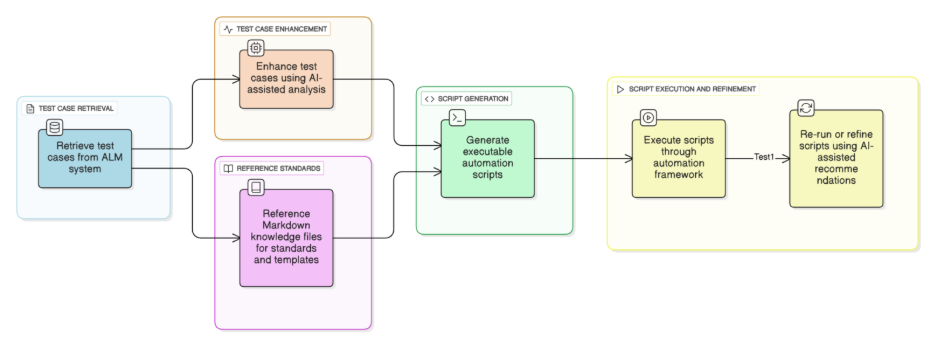
How It Works:
- AI executes automation scripts using standardized configuration inputs
- Environment details, test data, and execution parameters are externalized
- Execution remains repeatable, controlled, and auditable
This minimizes human intervention while maintaining accuracy and consistency.
6. Setting Up GitHub Copilot for Automation
Step 1: Install Copilot
- Install GitHub Copilot and GitHub Copilot Chat in your IDE
- Authenticate using your GitHub account
- Use both chat-based and inline suggestion modes
Step 2: Connect to Your ALM System
- Generate a Personal Access Token (PAT)
- Store it securely
- Use it to allow AI-assisted retrieval of work items and test steps
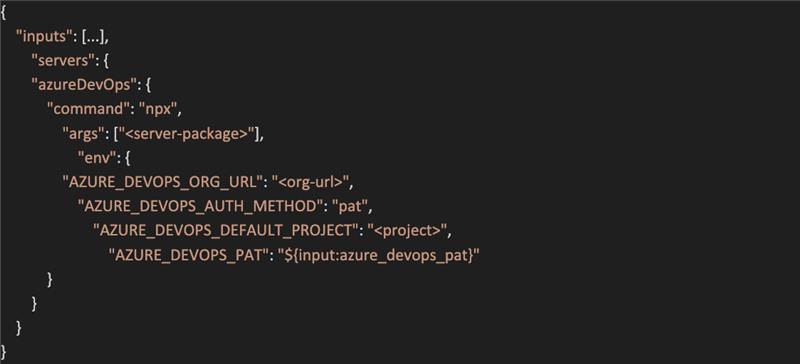
Step 3: Configure the MCP Server
- Define secure inputs for authentication
- Configure server settings for ALM integration
- Set environment variables such as:
- Organization URL
- Authentication method
- Default project or workspace
The IDE prompts the PAT securely and refreshes it when required.
Contents of the MCP file example are shown in below
Step 4: Start Using AI
- Generate automation scripts
- Assist with debugging and refactoring
- Review failures and suggest fixes
- Improve commit messages and documentation
Copilot + ALM integration enables end-to-end AI-assisted automation—from script generation to execution and debugging.
7. Limitations & Challenges
A. Human Oversight Is Still Essential
- Incomplete or ambiguous test steps require clarification
- Business rules may need expert validation
- AI interpretations must be reviewed
B. Not All Logic Can Be Fully Automated
AI struggles with:
- Highly dynamic data-driven validations
- Visual or layout-heavy scenarios
- Complex conditional workflows
C. Object Maintenance Remains Manual
- UI changes still require manual updates
- Dependency reviews are necessary
- AI can suggest logic updates, but human review and approval are required to ensure business intent and test accuracy
D. Dependency on Test Case Quality
AI effectiveness is directly tied to:
- Well-written test steps
- Clear expected results
- Up-to-date work items
E. Security & Governance
- Secure handling of tokens and credentials
- Regular rotation and access control
- Prompt hygiene to avoid sensitive data exposure
Conclusion
AI-assisted automation has become a powerful enabler for scalable, reliable testing. By converting natural-language test cases into standardized, executable scripts and improving collaboration across roles, AI significantly reduces manual effort while enhancing consistency and quality.
While human expertise remains critical, AI now serves as a practical productivity layer—bridging the gap between intent and implementation in modern automation workflows.