Introduction
In today’s automation-driven world, teams invest heavily in building robust test frameworks, yet a large number of failures still occur—not because of application defects, but due to inconsistent or missing data in test environments.
Before any automation script runs, there is an implicit assumption:
“The data is correct.”
Unfortunately, this assumption often turns out to be false.
This is where AI-driven database validation using Database MCP plays a critical role—ensuring that test environments are aligned with a baseline source of truth before execution begins.
Why Data Validation Matters More Than Ever
Modern applications operate in complex environments:
- Multiple databases across environments
- Frequent data refreshes
- Shared test environments
- Continuous deployments
In such setups, even a small data inconsistency can lead to:
- False automation failures
- Increased debugging effort
- Delayed releases
- Reduced confidence in test results
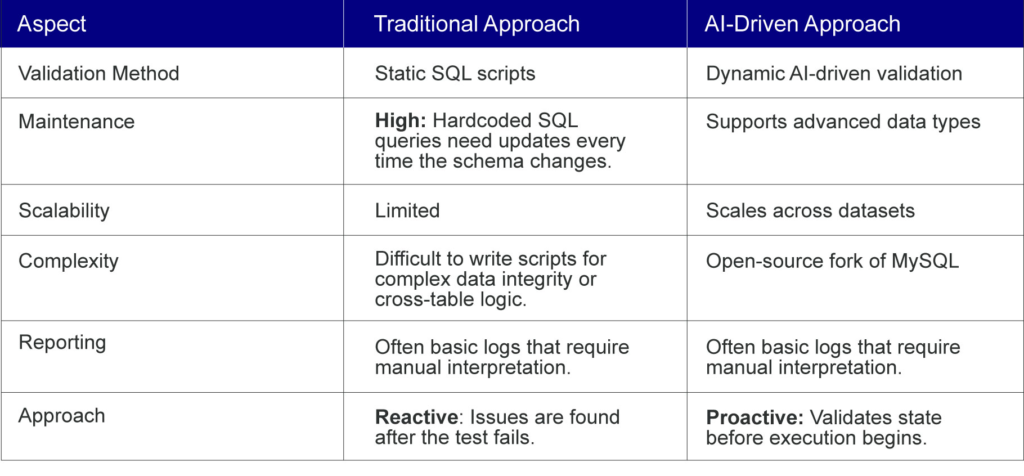
Traditionally, teams detect these issues after failures occur, making the process reactive and inefficient.
The Shift from Reactive to Proactive Validation
Instead of identifying issues after test failures, organizations are now moving toward a proactive validation approach:
- Validate database state before execution
- Compare test data with a baseline
- Identify inconsistencies early
- Generate actionable reports
This shift reduces uncertainty and improves overall automation reliability.
AI-Driven vs. Traditional Validation Scripts
How AI-Driven Database Validation Works
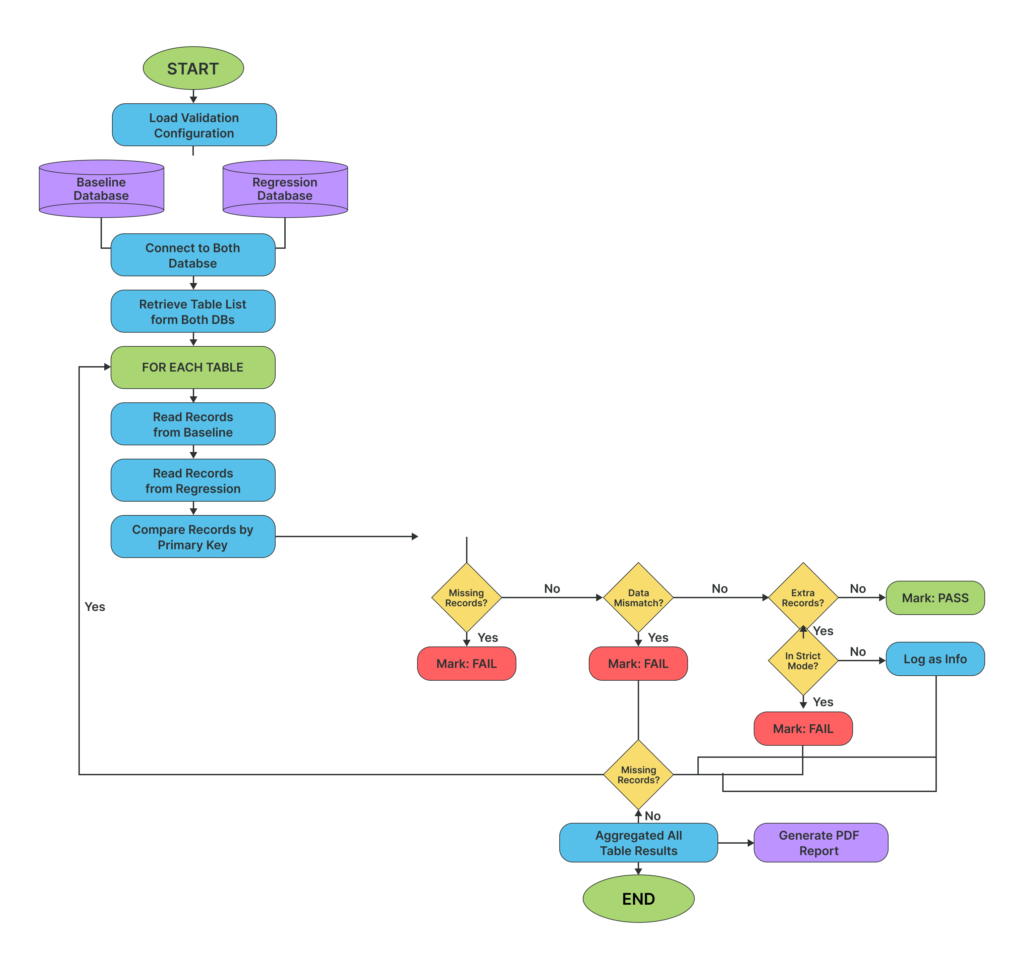
At a high level, the solution introduces an intelligent validation layer that operates before automation execution.
- Establish a Baseline
A baseline database acts as the source of truth, containing the expected state of data.
- Connect via Database MCP
Using Database MCP, the system securely connects to:
- Baseline database
- Test database
This ensures controlled and read-only access.
- Define Validation Logic
A structured AI-driven validation prompt defines:
- What data to compare
- Which rules to apply
- How results should be interpreted
- Perform Data Comparison
The system compares:
- Row counts
- Primary keys
- Data integrity conditions
- Missing/extra records
- Generate Validation Report
Finally, a standardized report is generated, highlighting:
- Pass / Fail status
- Table-level results
- Data mismatches
- Last updated timestamps
How to Configure AI-Driven Database Validation Using Database MCP
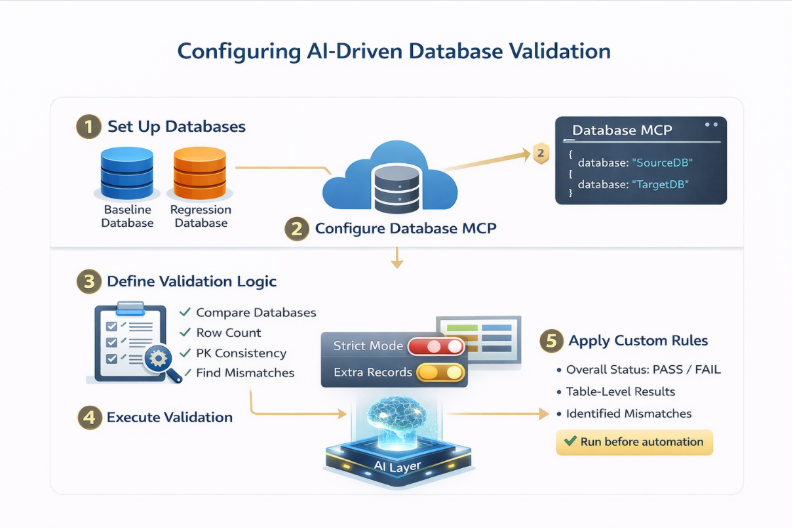
Implementing this solution involves setting up secure database connectivity, defining validation logic, and executing comparisons through a structured workflow. Below is a step-by-step guide to get started:
1. Set Up Database Environments
Start by identifying the two key environments:
- Baseline Database → Source of truth (expected data state)
- Test Database → Target environment for validation
Ensure:
- Both databases are accessible
- Required tables are present
- Schema consistency is maintained (for meaningful comparison)
2. Configure Database MCP for Secure Connectivity
Database MCP acts as the bridge between the AI engine and your databases.
You need to define MCP configurations for each database.
Example Configuration:
{
“baseline_db”: {
“command”: “npx”,
“args”: [
“-y”,
“@executeautomation/database-server”,
“–sqlserver”,
“–server”, “<server url>”,
“–port”, “1433”,
“–database”, “<baseline db name>”,
“–user”, “<db username>”,
“–password”, “<db password>”
]
},
“test_db”: {
“command”: “npx”,
“args”: [
“-y”,
“@executeautomation/database-server”,
“–sqlserver”,
“–server”, “<server url>”,
“–port”, “1433”,
“–database”, “<test_db name>”,
“–user”, “<db username>”,
“–password”, “<db password>”
]
}
}
Key Points:
- Use read-only credentials for safety
- Ensure correct database names and ports
- MCP abstracts database access into callable tools
3. Define the Validation Prompt
The validation logic is controlled through a structured prompt.
This prompt should clearly specify:
- Source (baseline) database
- Target (regression) database
- Validation rules
- Reporting format
Example Prompt:
Compare the baseline database and regression database.
Validation Rules:
1. Check row count differences for each table
2. Validate primary key consistency
3. Identify missing and extra records
4. Apply strict mode for selected tables
Generate a structured validation report with:
– Overall status
– Table-wise results
– Failure reasons
– Last updated timestamps
Best Practice:
- Keep prompts structured and deterministic
- Avoid ambiguity to ensure consistent outputs
4. Execute Validation Workflow
Once configured:
- Trigger the validation process
- AI engine connects via MCP
- Queries are generated and executed
- Data is retrieved and compared
- Results are analyzed
This process runs automatically without manual intervention.
5. Enable Configurable Validation Rules
To align with business needs, define rule variations such as:
Strict Mode Tables
- Extra records → FAIL
- Used for critical tables (e.g., Orders, Transactions)
Non-Strict Mode Tables
- Extra records → Informational
- Used for flexible datasets
You can dynamically update these rules in the prompt.
6. Generate and Review Validation Report
After execution, the system generates a structured report (HTML/PDF).
The report typically includes:
- Overall validation status (PASS / FAIL)
- Table-level comparison
- Identified mismatches
- Metadata (last updated timestamps)
- Actionable insights
This report becomes the decision point before running automation.
7. Integrate with Automation Workflow
For maximum impact, integrate validation into your pipeline:
- Run validation before test execution
- Fail pipeline if validation fails (for strict environments)
- Store reports for audit and traceability
Configuration Best Practices
To ensure reliable results:
- Maintain a clean and updated baseline database
- Use a consistent schema across environments
- Avoid overly complex prompts
- Standardize report formats
- Automate validation execution
Handling Large Datasets
One common concern is performance when comparing massive databases. To ensure efficiency, the AI-driven approach utilizes several strategies:
- Metadata First: The AI initially compares high-level metadata like row counts and table structures before diving into specific records.
- Intelligent Sampling: For multi-million-row tables, the AI can be prompted to validate specific data “clusters” or recent records based on the test case requirements.
- Batch Processing: Database MCP can retrieve data in chunks, preventing memory overloads while maintaining high-speed comparison.
Integrating with Modern CI/CD Tools
For maximum impact, this validation shouldn’t be a manual task—it should be a mandatory step in your pipeline.
- GitHub Actions: Use a workflow step to trigger the validation script. If the AI returns a FAIL status, the pipeline stops before the heavy automation tests even start.
- Jenkins: Incorporate the validation as a build step. Store the resulting HTML/PDF reports as build artifacts for easy auditing.
- Azure DevOps: Use “Gates” in your release pipeline to ensure the environment is ready before deploying or testing code.
Conclusion
With Database MCP handling connectivity and AI managing validation logic, this setup creates a scalable, repeatable, and automated data validation workflow.
Instead of manually verifying data, teams can now:
✔ Detect inconsistencies early
✔ Enforce validation rules dynamically
✔ Ensure environment readiness with confidence
Automation is only as strong as the data it depends on.
Reliable automation starts with reliable data. Leverage AI-powered database validation to eliminate data-related test failures before they happen.