What is Amazon RDS?
Every app needs a database to store data like user accounts, orders, or messages. Setting one up on your own means installing software, applying updates, taking backups, and preventing downtime. Amazon RDS (Relational Database Service) handles all of this for you. You pick a database engine and a size, and AWS takes care of the rest.
Supported Database Engines
RDS supports six popular engines, so you can use what you already know:
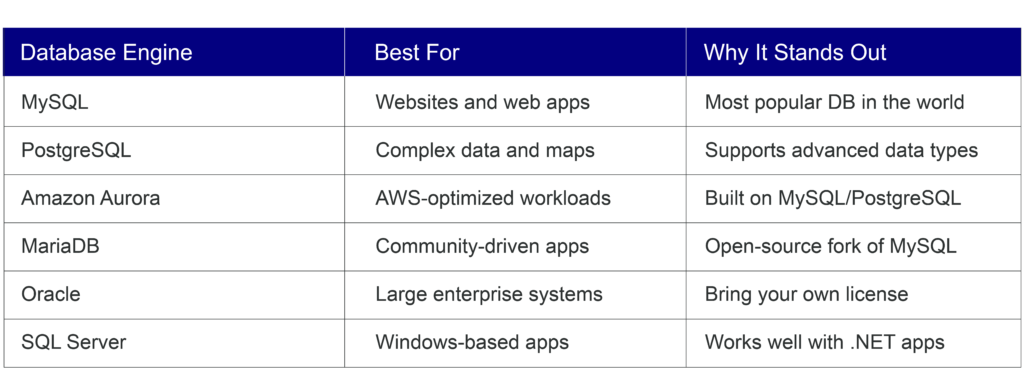
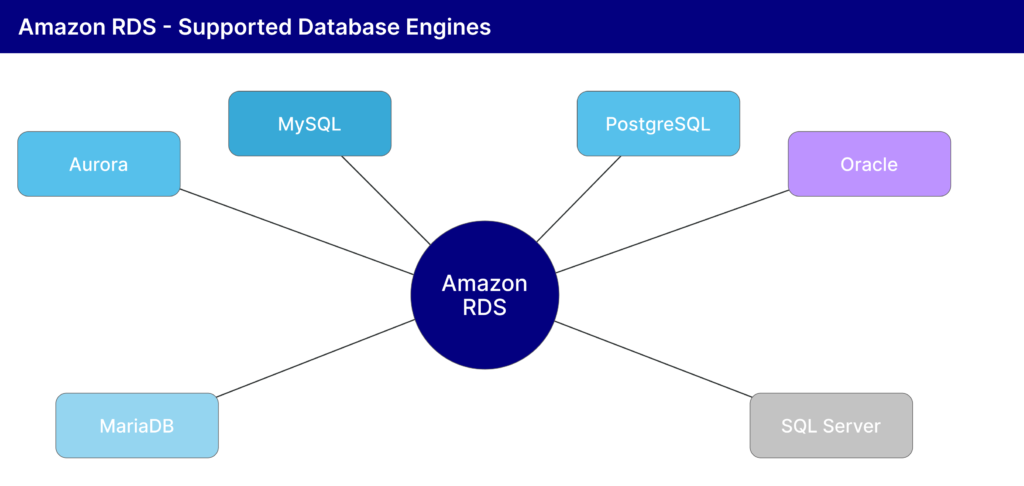
Figure 1: The six database engines supported by Amazon RDS
Key Features
Multi-AZ (High Availability)
With Multi-AZ enabled, AWS keeps a copy of your database in a separate Availability Zone. If the primary goes down, traffic switches to the backup automatically. Your users will not notice a thing.
Read Replicas
When your app gets heavy read traffic, a single database can struggle. Read replicas are copies that handle only read requests (like loading a product page). You can create up to 5 replicas, or 15 with Aurora.
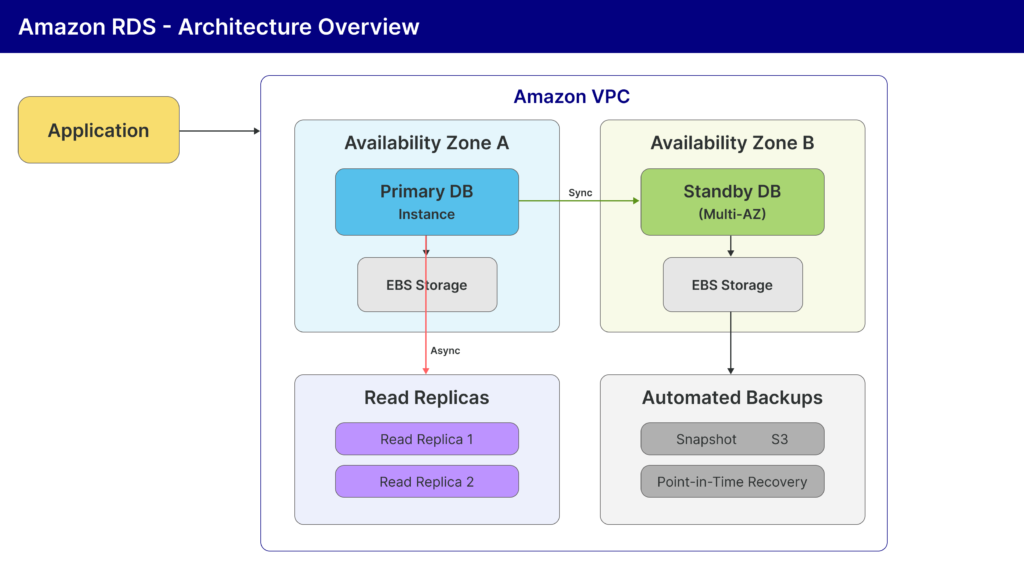
Figure 2: RDS with Multi-AZ, Read Replicas, and Automated Backups
Automated Backups
RDS takes daily snapshots of your database and keeps them for up to 35 days. If something goes wrong, you can restore to any point within that window. You can also take manual snapshots that stay until you delete them.
Security
RDS protects your data at every level:
- VPC: Your database lives in a private network, hidden from outside access.
- Encryption at Rest: Stored data is encrypted using AWS KMS keys.
- Encryption in Transit: Data between your app and DB is protected with SSL/TLS.
- IAM Authentication: Fine-grained control over who can access what.
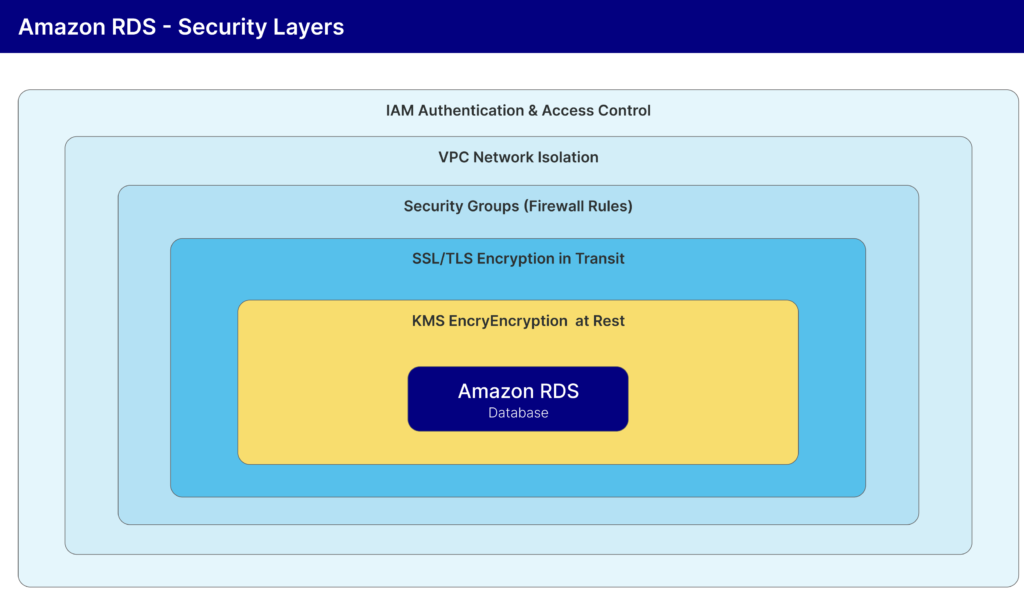
Figure 3: RDS security works in layers, each adding more protection
Scaling Your Database
You can scale up by switching to a larger instance with a few clicks. RDS also auto-grows storage when space runs low (up to 64 TB). The built-in Performance Insights dashboard helps you spot slow queries before they become a problem.
When Should You NOT Use RDS?
RDS is great for most cases, but not all. Skip it when:
- You need OS-level access. RDS does not give you access to the underlying server. Use EC2 with a self-managed DB instead.
- Your data is not relational. For documents, key-value, or graph data, consider DynamoDB, MongoDB, or Neptune.
- You need massive write throughput. RDS has one primary for writes. For millions of writes per second, DynamoDB or Cassandra works better.
- You want a fully serverless. You still pick instance sizes in RDS. For a pure pay-per-query model, try Aurora Serverless or DynamoDB.
- The budget is very tight. After the free tier, even small instances cost money. SQLite or free-tier cloud databases are cheaper for hobby projects.
Quick Architecture Example
Here is how a typical Node.js online store would use RDS. Users visit the site, Route 53 (DNS) directs them to a Load Balancer, which splits traffic across two EC2 instances. The app reads and writes to an RDS MySQL primary in Availability Zone A. A standby in Zone B takes over if the primary fails. A read replica handles product listing traffic, and RDS stores daily snapshots in S3.
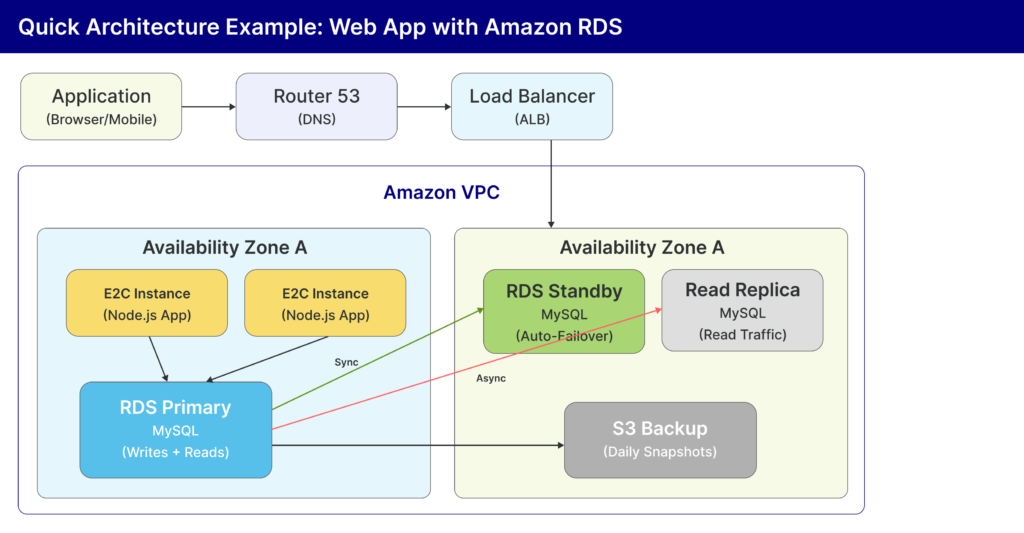
Figure 4: A typical web application architecture using Amazon RDS
How Much Does It Cost?
RDS is pay-as-you-go. Your bill depends on instance size, engine, storage, and data transfer. Committing for 1 or 3 years can save up to 69%. The AWS Free Tier gives you 750 hours/month of a db.t3.micro instance free for 12 months, which is perfect for learning.
Wrapping Up
Amazon RDS removes the hassle of managing databases. It supports the most popular engines, keeps your data safe, scales with your app, and handles backups automatically. Whether you are building a side project or a production application, RDS is a reliable choice for your data layer on AWS.