One of the main marketing points of cloud architecture is how highly available it is and can handle faults and unpredictable traffic spikes. In AWS, load balancing plays a critical role in achieving this.
From a simple web application to a globally distributed microservices platform, AWS Elastic Load Balancing (ELB) helps distribute incoming traffic efficiently across multiple targets. These targets usually include everything from EC2 instances and containers to IP addresses and Lambda functions.
However, designing an optimal load-balancing architecture cannot be limited to simply defining routing requests. Engineers need to understand:
- How traffic is distributed across Availability Zones (AZs)
- What the Cross-Zone Load Balancing feature actually does
- When it improves performance
- The hidden cost implications
- How it impacts scalability and fault tolerance
Let’s take a look at AWS Elastic Load Balancing with a strong focus on Cross-Zone Load Balancing, real-world architecture patterns, and the trade-offs architects must evaluate while preparing for production-scale systems and AWS Solution Architect certifications.
Understanding AWS Elastic Load Balancing (ELB)
AWS provides multiple types of managed load balancers under the Elastic Load Balancing family.
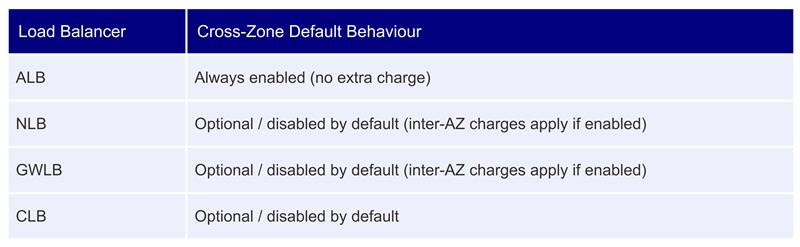
Most modern architectures primarily use:
- ALB for web applications and APIs
- NLB for high-performance networking
The Multi-AZ Architecture Problem
Before understanding Elastic Load Balancing and its subsequent Cross-zone Load Balancing feature, we first need to understand how AWS distributes traffic across Availability Zones.
Consider an architecture deployed across 3 Availability Zones:
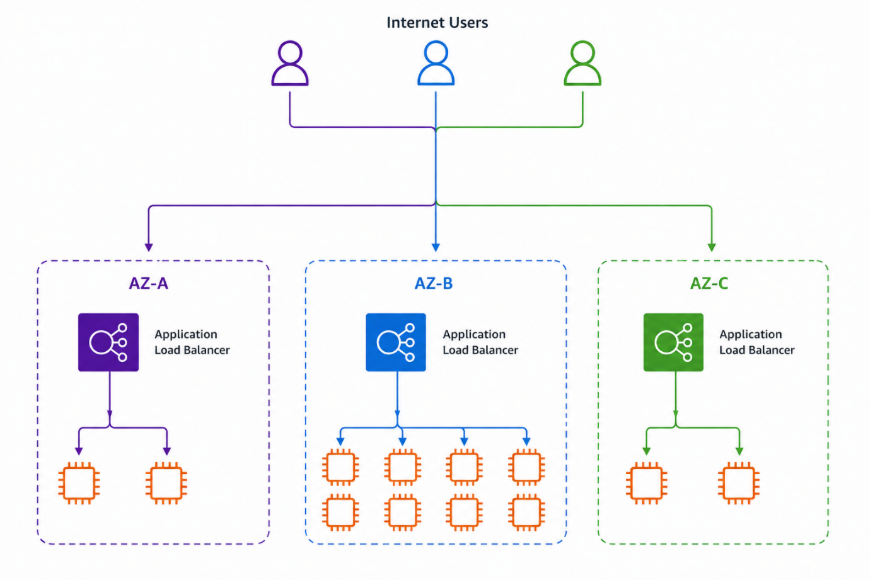
At first glance, this looks highly available. But there is an important issue:
- Traffic entering each AZ is initially distributed equally.
- Without Cross-Zone Load Balancing, each load balancer node only sends traffic to targets in its own AZ.
This creates uneven traffic distribution.
Problem Example
Suppose 12,000 requests/sec are split evenly across 3 AZs — 4,000 each. But AZ-A and AZ-C only have 2 instances apiece (handling 2,000 req/sec each), while AZ-B has 8 instances sitting at just 500 req/sec. AZ-A and AZ-C become overloaded while AZ-B remains underutilized. This is exactly the problem Cross-Zone Load Balancing solves.
What is Cross-Zone Load Balancing in ELB?
Cross-Zone Load Balancing is a commonly used configuration of ELB that allows a load balancer node in one Availability Zone to distribute traffic to targets in all enabled Availability Zones. Instead of restricting traffic to local targets only, AWS treats all targets as part of a shared regional pool.
Without Cross-Zone Load Balancing
Each ALB node routes traffic exclusively to targets within its own AZ — AZ-A’s node to AZ-A targets, AZ-B’s node to AZ-B targets, and so on.
With Cross-Zone Load Balancing Enabled
Every ALB node can route to targets in any AZ. All instances across the region form a single shared pool, and traffic is distributed evenly regardless of which AZ it entered through.
This results in better traffic distribution, improved resource utilization, reduced hotspot formation, and improved scalability.
Cross-Zone Load Balancing by Load Balancer Type
AWS handles Cross-Zone behavior differently depending on the load balancer type.
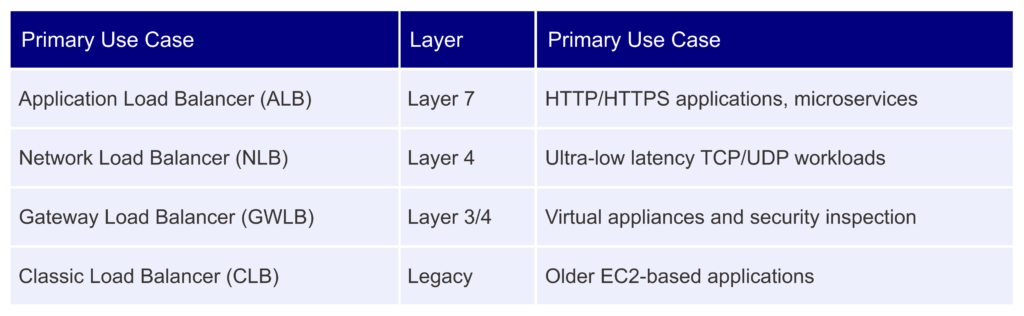
This distinction is extremely important for architects.
Application Load Balancer (ALB)
For ALB, Cross-Zone Load Balancing is enabled by default with no additional charge. AWS abstracts away most complexity, making ALB ideal for microservices, Kubernetes ingress, APIs, and web applications.
Network Load Balancer (NLB)
For NLB, Cross-Zone Load Balancing is optional and disabled by default. Enabling it can introduce inter-AZ data transfer costs and may increase latency slightly — an important architectural trade-off.
Gateway Load Balancer (GWLB)
For GWLB, Cross-Zone Load Balancing is also optional and disabled by default. If enabled, AWS charges inter-AZ data transfer fees. Because GWLB is typically used for traffic inspection via third-party virtual appliances, flow symmetry considerations make this an especially careful decision.
Elastic Load Balancing vs DNS-Based Distribution
A common misconception is that Route 53 can replace Elastic Load Balancing. It cannot – they operate at entirely different layers and serve different purposes.
Route 53 Operates at the DNS Level
Route 53 distributes traffic between endpoints based on latency, geolocation, weighted policies, or failover policies. However:
- DNS caching affects behavior – clients may receive cached records that are no longer optimal.
- Traffic distribution is less granular, operating at a broader endpoint level.
- DNS cannot react instantly the way load balancers can.
ELB Operates at Request / Connection Level
ELB provides much more granular, real-time control:
- Real-time health checks ensure requests are sent only to healthy instances.
- Per-request balancing provides fine-grained traffic control.
- Dynamic scaling awareness — the Auto Scaling group scales based on load balancer metrics.
Both services complement each other and are often used together. Route 53 handles where traffic enters a region; Cross-Zone Load Balancing handles how it is distributed within it.
The Hidden Cost Trade-Off of Elastic Load Balancing
Elastic Load Balancing comes with transfer costs as data moves from one AZ to another. Understanding the financial implications alongside the performance benefits is essential.
Inter-AZ Data Transfer Costs
When traffic crosses Availability Zones, AWS charges inter-AZ data transfer fees. This creates additional network overhead that at enterprise scale can become significant.
Real-World Example: Streaming Platform
Imagine a video streaming platform with 5 Gbps traffic, a multi-AZ deployment, and NLB with Cross-Zone enabled. If 40% of traffic is directed to a different AZ:
5 Gbps × 40% = 2 Gbps cross-AZ traffic
Monthly data transfer costs can become extremely expensive at this volume. In high-throughput systems, even small architecture decisions can create massive operational costs.
This is why Solution Architects must balance performance, availability, and cost efficiency rather than optimizing only one dimension.
When Should You Enable Cross-Zone Load Balancing?
Not every AWS deployment requires Cross-Zone ELB. Solution architects need to understand their needs thoroughly before implementing this solution.
If you require help in understanding ELB or implementing it across your enterprise, Byteridge can help. Our solution architects specialize in AWS and bring a decade worth of experience in tech infrastructure solutions.
For now, let’s understand the scenarios that require ELB on an enterprise scale.
1. Uneven Target Distribution
If your Availability Zones have different numbers of instances due to Auto Scaling lag, blue/green deployments, or an AZ outage, Cross-Zone helps distribute load fairly across all available capacity.
2. Kubernetes / EKS Clusters
Container workloads scale dynamically, and Pods are distributed across nodes in different AZs. Cross-Zone balancing improves Pod utilization, request distribution, and service reliability.
3. Stateless Applications
Since stateless APIs carry no session data, requests can be routed to any instance in any AZ, improving both performance and flexibility.
When Should Elastic Load Balancing Be Disabled?
1. High Throughput Systems
Applications transferring terabytes or petabytes of data daily – video streaming, financial markets, real-time analytics, gaming backends – may disable Cross-Zone to avoid significant inter-AZ data transfer charges.
2. Low Latency Applications
Cross-AZ routing introduces additional network hops. Applications requiring ultra-low latency prefer keeping traffic local and deterministic.
3. Stateful Applications
If servers need to store session data, Cross-Zone Load Balancing cannot be used; requests for a given user must always reach the same instance.
Cross-Zone Load Balancing and Auto Scaling
Cross-Zone balancing pairs particularly well with Auto Scaling Groups. Without it, uneven per-AZ traffic causes certain zones to hit their scaling thresholds repeatedly while others stay idle — leading to instability, hotspots, and wasted capacity. With Cross-Zone enabled, all instances across all AZs share the load equally, so Auto Scaling triggers are smoother, scaling events are fewer, and the application stays more resilient overall.
Architecture Pattern: ALB + Auto Scaling + Multi-AZ
One of the most common AWS production architectures combines a single regional Application Load Balancer with Auto Scaling Groups across multiple Availability Zones:
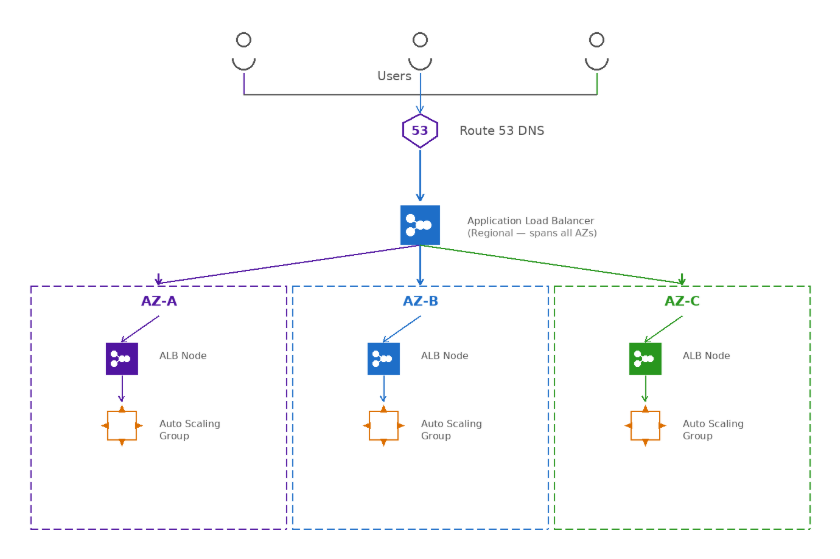
This pattern delivers high availability (ALB re-routes instantly if an AZ fails), elastic scalability (Auto Scaling handles traffic spikes automatically), and operational simplicity – AWS manages health checks, failover, and traffic routing end to end. It is the standard starting point for SaaS platforms, e-commerce systems, APIs, and enterprise applications.
Best Practices for Architects
1. Design for Even AZ Capacity
Even with Cross-Zone enabled, strive for balanced infrastructure across AZs. Failure of a heavily loaded AZ can still impact performance.
2. Monitor Inter-AZ Costs
Use AWS Cost Explorer, VPC Flow Logs, and CloudWatch metrics to identify hidden network charges before they escalate.
3. Prefer Stateless Services and Combine with Auto Scaling
Stateless architectures maximize load-balancing flexibility. Use JWT and AWS ElastiCache for session storage so any instance can serve any request. Pair this with an Auto Scaling group and the system handles sudden traffic spikes and AZ outages automatically, without manual intervention.
4. Understand Your Traffic Patterns
Traffic patterns differ widely between system types. In high-throughput systems, Cross-Zone Load Balancing may introduce latency and inter-AZ transfer costs. Understand your traffic flows before enabling or disabling any feature.
Conclusion
Cross-Zone Load Balancing may look like a simple toggle, but it touches application stability, scaling behavior, infrastructure costs, and resource efficiency. For most web applications and APIs, ALB with Cross-Zone enabled is the right default; it’s already on and free. For high-throughput or latency-sensitive systems, the NLB configuration decision deserves careful analysis of your traffic patterns and cost profile.
AWS Load Balancing is far more than distributing traffic. Mastering these trade-offs, whether for the AWS Solutions Architect exam or a real production system, is what separates a working architecture from a resilient, cost-efficient one.