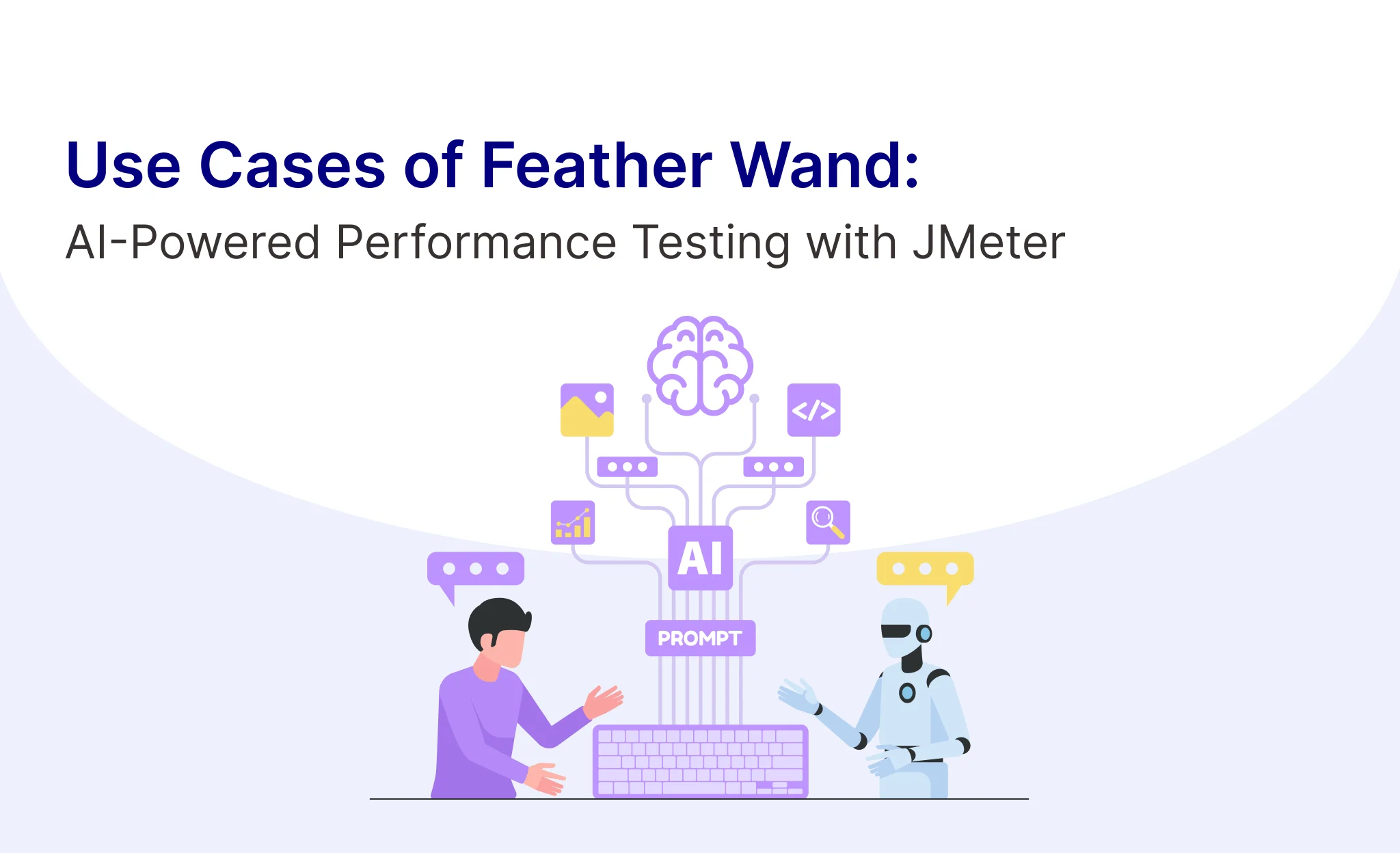
Feather Wand is a JMeter plugin by QA Insights that lets you interact with AI directly inside JMeter. You describe what you need — an HTTP sampler, a Groovy script, a load profile — and the AI builds it. It works with Anthropic Claude, OpenAI, Ollama (local), and DeepSeek.
Important Note: In this POC, the tool worked well for API-level test creation — single endpoints, basic load configs, and script generation. Full end-to-end performance testing (complex user journeys, token correlation, multi-step flows) still needs a performance engineer to design, validate and interpret. The AI handles the repetitive parts; the thinking stays with the engineer.
Setup — Tools & Plugins Needed
Two setup paths are available depending on which Feather Wand workflow you want to use. The following tools and plugins are required:
Feather Wand Plugin (Chat Panel)
- Apache JMeter 5.6.3 or later
- Feather Wand JAR (jmeter-agent), installed either by copying the JAR into the JMeter lib/ext folder, or via JMeter → Options → Plugins Manager → search “Feather Wand” → Apply and Restart
- An AI provider connection — Anthropic Claude, OpenAI, Ollama (local), or DeepSeek
Claude Code Terminal (Autonomous Workflow)
For the more powerful, autonomous interface that can edit JMX files, run tests, and analyse results directly, the following are additionally required (one-time setup):
- Node.js v18.x or higher
- Claude Code CLI (@anthropic-ai/claude-code via npm), version 2.1.145 or higher, authenticated with an Anthropic Console account
- An Anthropic API key (from console.anthropic.com → API Keys), with billing credits added if on pay-per-use
- jmeter.properties updated with the Anthropic API key, the Claude CLI path, the default model (claude-3-7-sonnet-20250219), and streaming enabled, followed by a JMeter restart
Use Case 1 — API Test Plan Generation via Terminal
We asked the Claude Code Terminal to create a JMeter test plan for a GET request, then scale it to 10 virtual users. Claude generated a complete .jmx file (Thread Group, HTTP Sampler, Response Assertion, Listeners), and updated the thread count and ramp-up time autonomously when asked — no manual JMeter element dragging required.
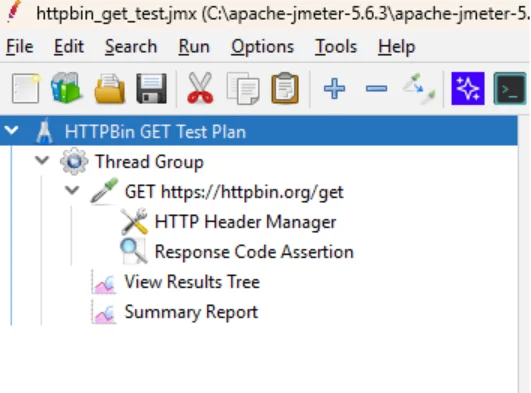
JMeter GUI loaded with the AI-generated test plan — Thread Group, Sampler, Assertion, Listeners all present
Use Case 2 — Running Tests and Analysing Results
We ran the 10-user test and asked Claude to interpret the results. It correctly identified the bottleneck (TCP connection time, not server processing) and explained the response pattern across threads — but as the note below highlights, a performance engineer still needs to validate the test design and decide on thresholds.
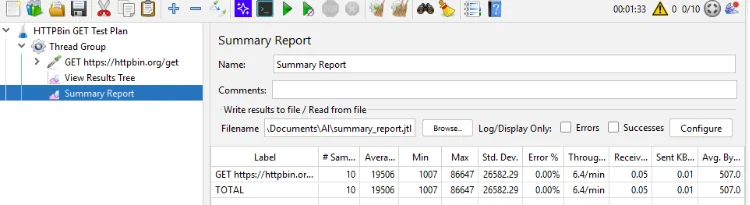
The AI analysis was accurate and useful — but this was a simple API endpoint. For real application load tests, a performance engineer still needs to interpret results in context, validate the test design, and decide on thresholds.
Use Case 3 — Groovy Script Generation
We asked Claude to write a JSR223 Post Processor that captures the response body, thread name, URL, status and elapsed time, and saves it to a timestamped file per thread. The generated Groovy script included correct imports, file writing logic, and all variables properly wired together — correct on the first attempt, with no manual edits needed.
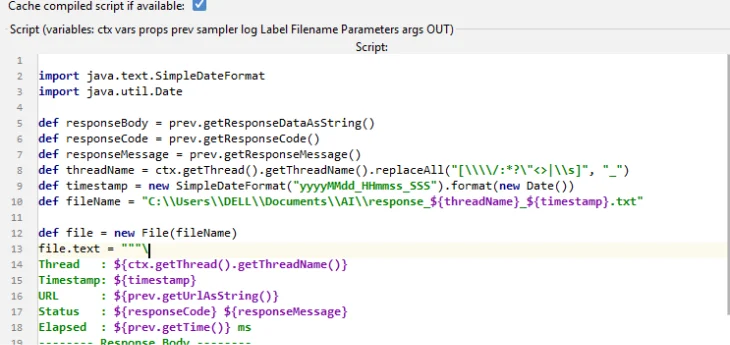
Groovy script generated by Claude — imports, file writing logic and all variables correctly wired
Use Case 4 — Feather Wand Chat Panel
Feather Wand also provides an integrated AI-powered chat panel directly within the Apache JMeter interface, focused on interactive assistance rather than full automation. We used it to add a Response Assertion to a sampler and inspect a selected element with the special @this command, which returned element type, properties, parent details, and suggested related elements.
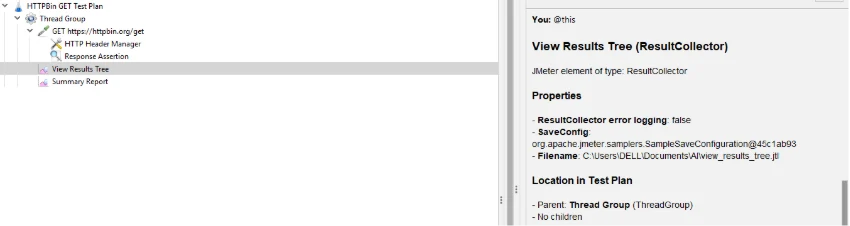
This command output displaying Response Assertion properties and JMeter hierarchy details
4.Feather Wand Chat Panel vs Claude Code Terminal
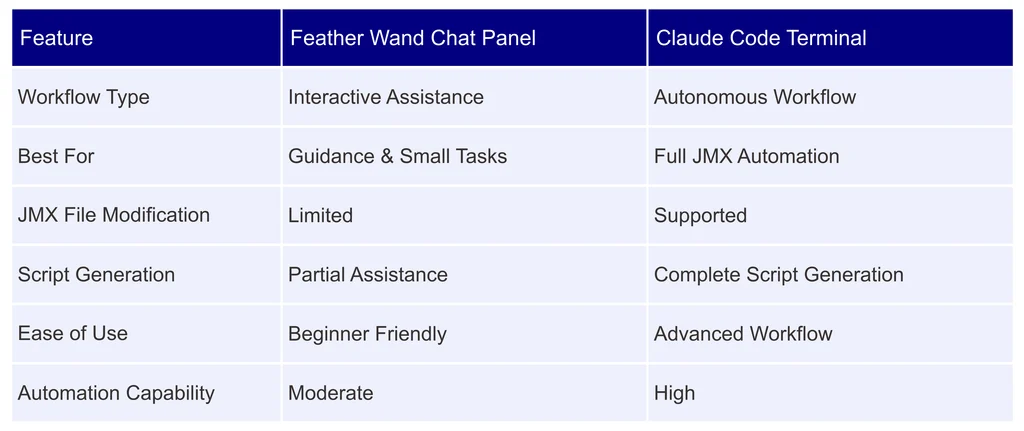
The Feather Wand Chat Panel was useful for interactive guidance and smaller configuration tasks inside JMeter, while the Claude Code Terminal provided stronger automation capabilities for creating, modifying, and executing JMeter workflows.
5.Limitations — What This Tool Cannot Do (Yet)
- End-to-end performance testing — full user journeys with login flows, session tokens, and dynamic correlation still need a performance engineer to design
- Dynamic correlation — extracting and reusing tokens across requests automatically is not yet supported (Correlation Engine is on the roadmap)
- Complex assertions — validating business logic or chained API responses needs manual setup
- Result interpretation — the AI can describe numbers but cannot decide whether a test has passed or failed against SLAs
- Embedded terminal bug — Jedi Term dependency missing in v2.0.7 means the terminal runs externally for now; expected to be fixed in the next release
Bottom line: Feather Wand is a productivity tool, not a replacement for performance engineering expertise. It accelerates the scripting and setup work — the strategy, design and analysis still belong to the engineer.
Conclusion
Feather Wand does what it promises for API-level test creation. The Claude Code Terminal can generate a working JMeter test plan, scale virtual users, run the test, and produce a results analysis — all from plain English commands. That’s genuinely useful for reducing setup time.
For anything more complex — multi-step flows, correlation, real-world load modelling — the plugin is a helpful co-pilot, not an autopilot.
Explore how AI can streamline JMeter test creation with Feather Wand.